
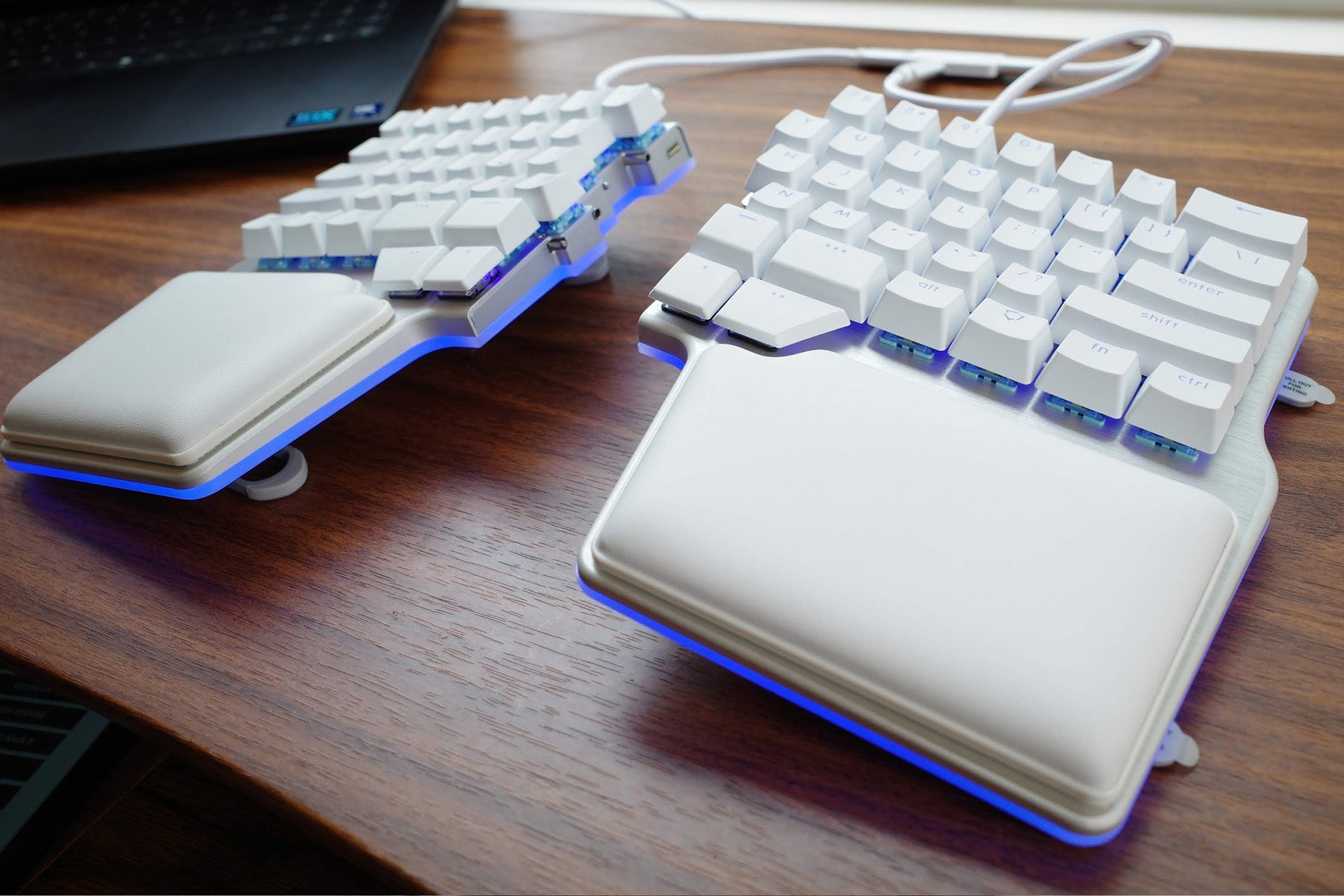
The Dygma Raise 2 is a split ergonomic keyboard that has competitive gamers directly in its sights. This isn't your average gaming keyboard; it’s a luxurious, split, battle deck with the customization potential to make it your own in a way few others can compete with. Unlike most ergonomic split keyboards, it doesn’t force the gap on you. When you're feeling traditional, you can easily recombine its halves while still maintaining the competitive edge of its feature set. It doesn’t come cheap and this level of customization is frankly not for everyone, but compared to other ergo keyboards aimed at gamers, it has a lot to offer.
Dygma Raise 2 – Design and Features
If the Dygma Raise 2 were a video game, it would be a genre blender. It combines multiple design inspirations into one package, offering ergonomic sensibilities with gaming-friendly features and aesthetics, and advanced programming that's able to satisfy gamers and programmers alike. And though this compact peripheral spins multiple plates, it somehow keeps them all in the air, making it one of the best ergonomic gaming keyboards you can buy today – and one worth considering for your daily workflow if you spend all day at a PC.

Coming to market at $369 via Dygma's website, it doesn't come cheap and is clearly positioned as a premium product. That impression begins from the minute you open the box. The Raise 2 doesn't come in traditional cardboard packaging. Instead, it comes in its own custom carrying case. It's semi-hardback for protection and trimmed with woven fabric on the outside. The inside is molded to match the keyboard and its accessories exactly and is lined in a velvety fabric to keep everything safe and scratch-free.
The keyboard itself feels equally high quality. Starting with construction, I was impressed to see that it comes in a fully aluminum case. There's no plastic to be found here, outside of the switches and keycaps. Speaking of, it’s topped with double shot PBT backlit keycaps that won't fade or show finger oils nearly as easily as typical gaming keycaps. It should look just as good years into the future as it does when taking it out of the box the first time with just an occasional wipe down.

Out of the box, the two halves of the keyboard are joined solidly together using a rail system that allows it to look and feel like a more traditional keyboard. There’s no wobble to speak of. It’s rock solid, and the rail system is simply leagues better than most split keyboards which push together like puzzle pieces.
Each half includes an integrated palm rest that enhances its comfort and ergonomics. It does diminish its compactness somewhat, but it’s a worthwhile trade-off in my opinion and gives the keyboard a unique look. You can use the palm rest on its own with just the metal case to support your hands, but the keyboard also comes with leatherette foam pillows that attach magnetically and are shaped to match the exact layout of each half.
Above the bottom row, the Raise 2 uses a standard 60% layout that lacks a function row or dedicated arrow keys, like the Wooting 60HE or Ducky One 3 Mini, but there are major changes below the waistline. Instead of a spacebar, there’s a thumb cluster of four smaller, programmable buttons on each half. The two top keys are standard height and use your switches of choice, but the two bottom buttons use low profile switches so your thumb can easily slide down for quick access.
It looks unconventional, but most people tend to hit the keyboard with one thumb, typically in the same spot. Swapping to a thumb cluster like the ErgoDox, gives you seven extra programmable keys, perfect for macros or shortcuts. Or, like many ErgoDox users, you could map some of these keys to other common functions like Backspace, Enter, Delete, or “layer” keys that allow you to quickly access secondary functions for every key. There’s a small learning curve, but climbing it returns benefits to productivity as well as gaming.

The thumb cluster supports ergonomics by allowing for less hand movement, but more important is the split itself. The typing area on a traditional keyboard is narrower than most shoulders and forces you to tuck your arms in to type. Likewise, because you're working on a single, uniform slab, all of the keys are positioned straight on, forcing you to turn your wrists outward to actually use them. Neither of these are a good match for the human body and can lead to repetitive stress injuries over time through pronation, supination, and ulnar deviation.
The Raise 2 gives you the ability to avoid all of that. The split allows you to properly space your arms more comfortably and adopt a more neutral position. Each side being independent also means that you can angle them to better match the angle of your wrists.
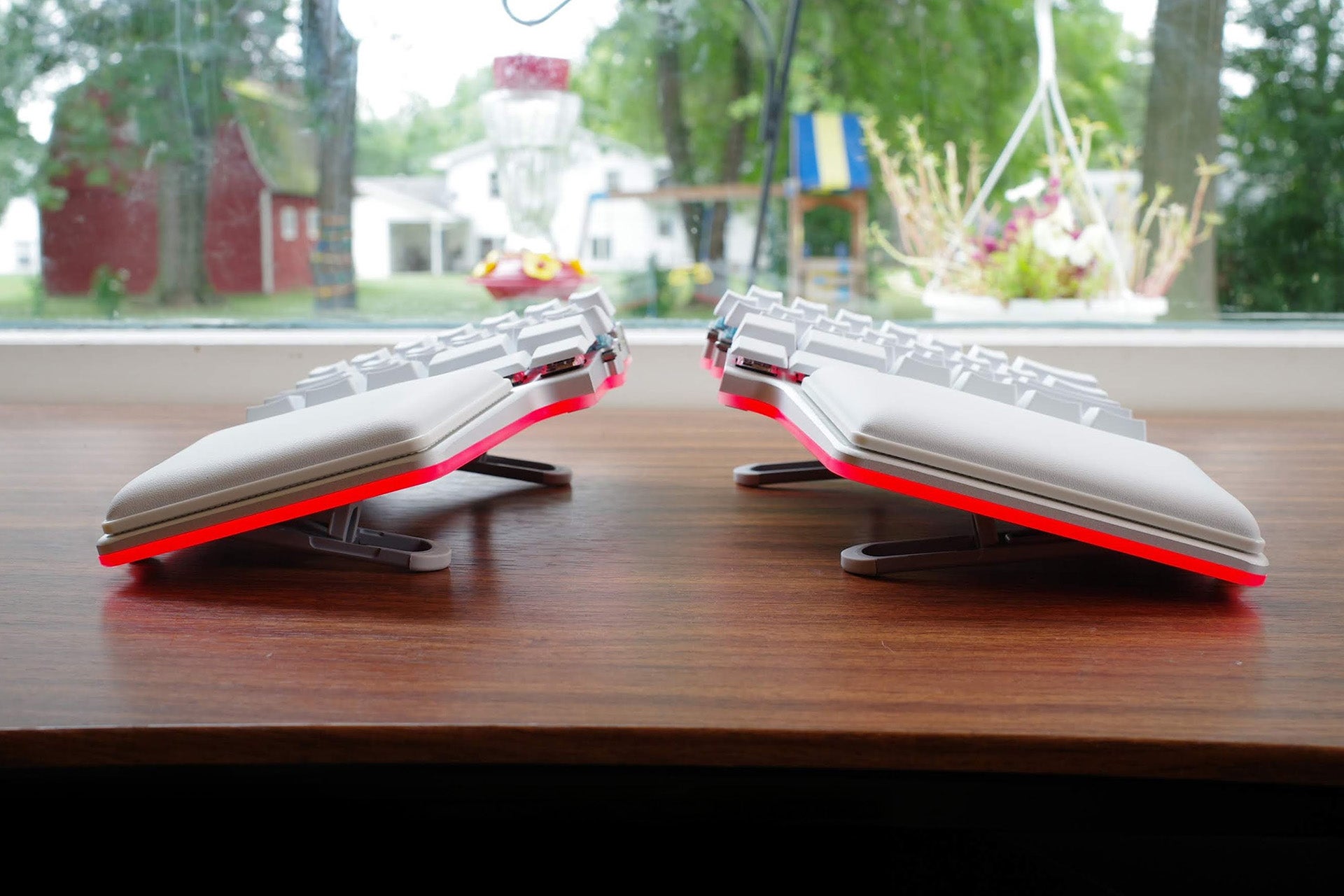
But the keyboard has one more trick up its sleeve, albeit one that you’ll need to pay extra to experience: tenting. The ability to "tent," or vertically angle each side of the keyboard, is a key feature of many split keyboards in the productivity world, but is still uncommon in gaming. Since the Raise 2 is designed around proper ergonomics, its inclusion here makes a lot of sense (even if I wish it was a default feature instead of an optional add-on).
On the underside, you'll find not one, not two, but three sets of adjustable tilt feet that allow you to personalize the angle from a flat zero degrees to a relatively steep 60 degrees. This is done using two long horizontal tilt feet on the top and bottom, each inset with three smaller tilt feet that can be turned to slot into a track, locking the angle. The feet closest to the edge of the keyboard flip out to add stability. You don't need any tools and these changes can be applied in just seconds. At its highest, your palms essentially face each other, the same way that they will if you make a right angle with your elbow.
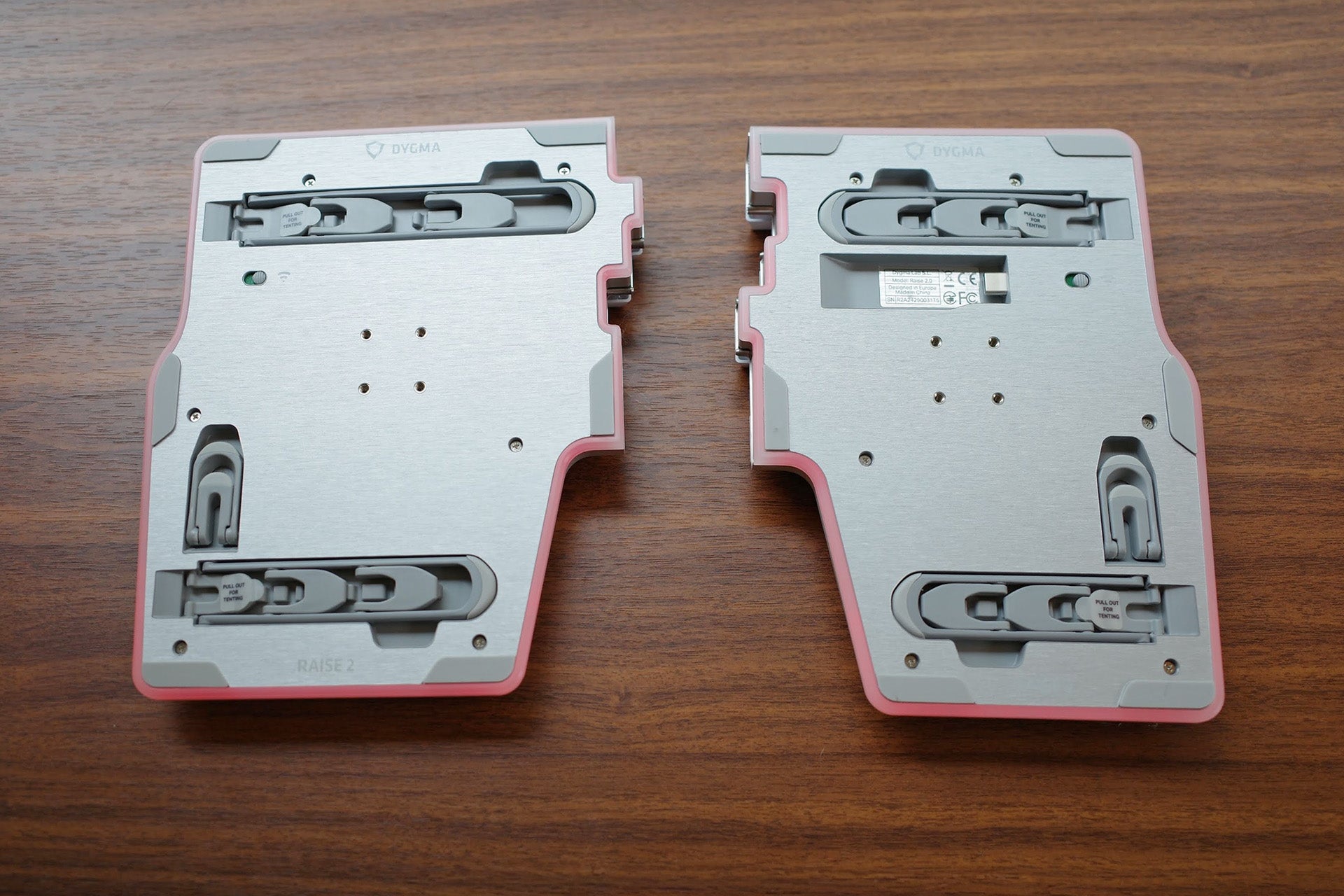
And if you opt into the Tented Base add-on ($80), you'll also be able to add one of my favorite features from the original Dygma Raise: the 360-degree underglow lighting ring. Each is encircled with a light diffuser, projecting a colorful glow underneath. It was already bright on the first Raise, but Dygma has made it even brighter here. It’s gorgeous, topping every other gaming keyboard with a similar light ring I’ve encountered. It gives the appearance that the keyboard is floating on a base of light and is an even more striking feature than its per-key RGBW backlighting.
It’s only aesthetic, but it’s so defining that I wish it were included on every keyboard. Unfortunately, it's another add-on that will run you a second $80, bringing your add-on total to $160 – and that’s without considering any other extras or accessories you might be interested in, like wireless connectivity.
If there's an Achilles' heel that split keyboards face outside of the initial learning curve, it's the amount of wires they require. Depending on the board, you'll have to connect both halves to each other and then run another wire to the PC. Or sometimes both halves run into a central unit which connects to the PC. In its wired configuration, that's where the Raise 2 falls, with each half needing to connect to a small hub that Dygma calls the Neuron.

Upgrade to wireless and all of that goes away, at least for a while. With this add-on, the USB hub also acts as a wireless transmitter, allowing both halves to operate wirelessly with a 1,000Hz (1ms) polling rate for gaming-grade responsiveness. It's also able to connect to up to five different devices over Bluetooth, though for gaming, you'll definitely want to use 2.4GHz for the best responsiveness.
I say “at least for a while” because all of its bold lighting makes a huge impact on its battery life. Each half comes with a 2,370mAh battery (4,740mAh total), which Dygma rates at around 20 hours of life with the lighting on max. Dropping brightness can extend this (as can connecting over Bluetooth) but you’ll be recharging this keyboard relatively frequently.
All of these add-ons are meaningful upgrades to the Raise 2, and it’s to Dygma’s credit that it’s offering addons that genuinely enhance the experience. But brace yourself, because the current pricing model means that if you want this keyboard fully kitted out, you’ll need to spend $619. You read that right.

The Raise 2 is unique in the market and, with its programming options and split design, can offer a pretty great experience to anyone willing to take the time to adapt to it and learn its software. But at that price, you could pick up one of the best monitors, a great budget laptop, or the Nintendo Switch 2.
This doesn't make the Raise 2 a worse product, mind you. Halo products have their place, after all. But it does mean that the keyboard isn't going to be accessible to a huge range of gamers and power users. This is a keyboard that you’ll have to know that you want and precisely why you want this exact thing for that price to make sense.
Should Dygma have included things like the tent kit and the RGB base in the base price? Maybe. But it's also worth remembering that this is a small team, making something that no one else is, supporting it with boutique software that’s surprisingly powerful, and actively maintaining it with firmware and software updates. The R&D costs, the manufacturing, the salaries and benefits for employees, and all of the other overhead for a company like Dygma to exist are all a part of that price.
I get it, but man, does it sting.
Dygma Raise 2 – Software
You can't talk about the Dygma Raise 2 without also talking about its software. It's so important to the overall experience that while it is technically optional, you would be depriving yourself of the keyboard's true functionality to go without.
The keyboard uses a software suite called Bazecor. It offers most of the functionality you would expect, with the only real limitations appearing in the lighting, which currently lacks the ability to customize the preset lighting animations. It does allow you to easily create your own static lighting settings, though, so there’s still plenty of room to make the keyboard your own. These settings can even be applied to individual layers, and I personally use it to highlight shortcut keys I’ve programmed in.
Programming keys is where things get really interesting. Being able to remap keys and assign macros is a staple of gaming keyboards and is especially important for compact keyboards like the Raise 2. But if you’re worried about its missing keys, don’t be. You can reassign them to secondary layers that are only a thumb button away.
Think of layers like virtual keyboards that you access by a button of your choice. Hold that button and those secondary functions become available, like holding Shift to access symbols along the number row. The thumb buttons make the perfect companion to this system, allowing you to have a whole second, third, or fourth set of keys and functions readily accessible without needing to reposition your hand.
Dygma also gives you multiple options for how to access these layers which can be creatively employed to improve your play or workflow. You can tap and hold, like a normal Fn button, or choose to have to swap to another layer until you tap the key again, perfect for quickly swapping layouts between games or roles. You can also set One-Shot keys, where you can fire off a single command and have it automatically bounce back to your original layer.
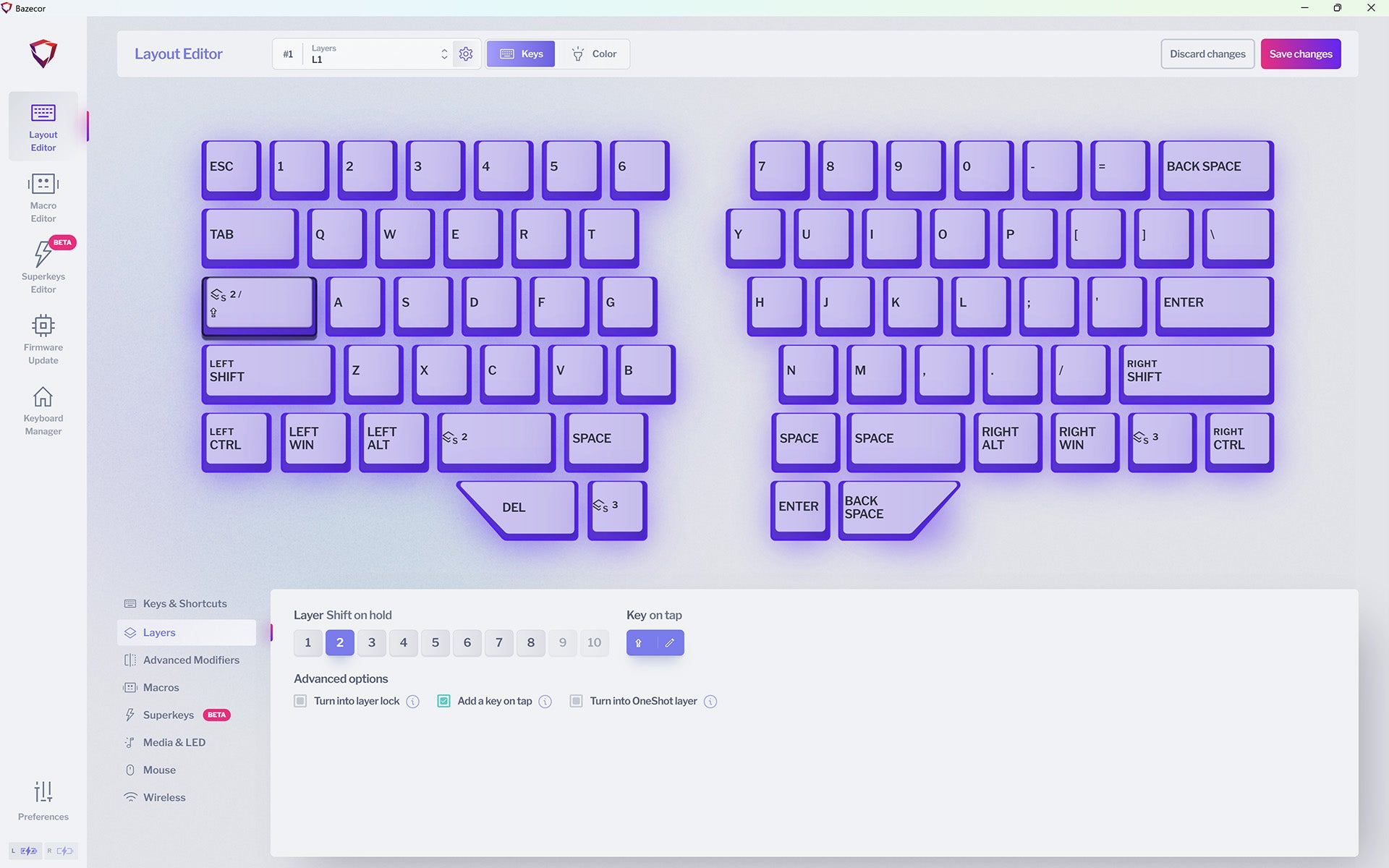
The remapping options are generous. You can assign keys, media controls, mouse controls, and Windows shortcuts. You can assign dual functions to keys, where tapping a button sends one output and holding it sends another. Every input can also become a shortcut with any combination of modifier keys.
The software also gives you the powerful ability to create Superkeys. This feature allows you to map up to five different actions to a single key. Tap, Hold, Tap and Hold, Double Tap, Double Tap and Hold can all have individual assignments. You're not limited to basic keyboard inputs, either. These can be macros, shortcuts, and just about anything else you would usually be able to map.
It's a powerful set of tools that sounds simpler at first than it actually is. With a little creativity, it's possible to give the Raise 2 more utility than a TKL keyboard. Superkeys, in particular, is hugely powerful even in basic tasks like double-tapping a key instead of hitting a shortcut. It does take time to set up, and you should plan on needing to make adjustments as you go, but over time you’ll find that the Raise 2 becomes uniquely your own in a way most other keyboards simply can’t.
Dygma Raise 2 – Performance
Coming to grips with the Dygma Raise 2 is a bit like peeling back an onion. While you can use it straight out of the box as a basic split keyboard with a few extra thumb buttons, the more you invest into it, the more it gives you in return. Features like Superkeys, dual function keys, and multiple layers of virtual keyboards for game-, app-, or situation-specific keymaps make it uniquely well suited to improve your performance in both work and play.
I'll admit that when I first started using it, I didn't completely comprehend its potential. As I tested all of its different features and modes, however, it became crystal clear how customizable it really is. In my case, I do a lot of writing outside of gaming. That means a lot of navigation and text formatting, which can be difficult with a 60% keyboard that lacks physical keys for many of those functions. Yet here, I was able to map formatting controls to simple tap and hold commands. It never got in the way of typing because single keystrokes still worked normally.

For gaming, this also has natural benefits. Being able to tie up to five different functions to a single key can enhance the efficiency of skill and spell rotations to make you more capable in combat. In World of Warcraft, this was useful as I leveled up my paladin and tanked dungeons. Rather than automate my whole rotation, I tied resource based attacks to my main attack button and used double-tap to trigger them. In Battlefield 4, I did something similar but tied my rocket launcher to a double tap of my primary weapon key.
By giving users the option to perform multiple actions with a single key press, the Raise 2 becomes an inherently more efficient input device for anyone willing to take the time to make it their own. If you’re like me, once you realize the potential of what it can do, you’ll find yourself wishing that every keyboard you use offered the same. You can see an example of my productivity keymaps in this review for an example of just how much utility its functions can add to the base layer without losing any physical keys.
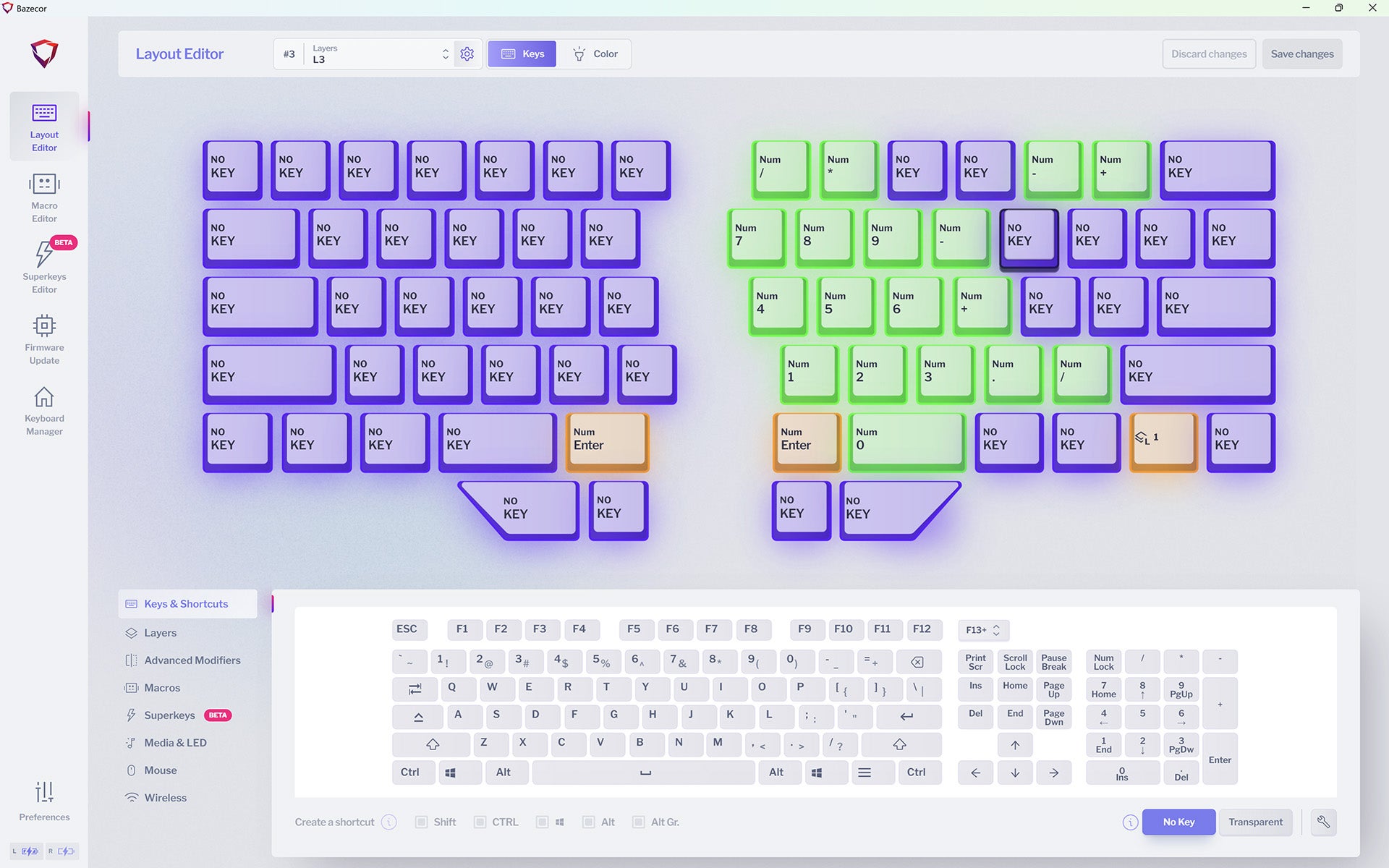
The Superkeys feature is currently in beta. It works, but I'm excited to see it come to a final release for a bit better latency. Any button assigned a Superkey has a small touch of latency as the keyboard processes the five layers of commands. I tend to be very sensitive to this kind of thing and noticed it right away. It didn’t impact the accuracy of my typing, however, so I was usually able to ignore it.
The actual typing experience is very good. Compared to the original Dygma Raise, it's notably better, with improved acoustics and better feeling keys. The stabilizers came pre-lubed from the factory, so there wasn’t any rattle on my sample. I also found it to be very responsive, even over Bluetooth.
The ability to use the keyboard wirelessly is game-changing. I love split keyboards, but honestly, they’re a lot to manage with multiple wires to spread across your desk. The Raise 2 eliminates that. I was able to tuck the Neuron out of sight and the keyboard still performed flawlessly and gave my desk a clean look that I really enjoy.
Though the keyboard is already small, being able to use one side at a time is a major benefit for competitive shooters. There’s no need to angle the keyboard or perform weird wrist gymnastics to maximize your mouse space. In my case, I set one of my layers specifically for one-sided use, turning it into a fully functional control pad using a fraction of the footprint of a normal keyboard.
The big question here is whether all of this functionality is “worth it” when the asking price is so high. There’s no way around it: This is a luxury gaming keyboard. But unlike many “premium” products that bank on name recognition and flashy looks, the Raise 2 offers genuine utility that could enhance your productivity and performance in games. It won’t suddenly make you a better gamer, but it’s the kind of tool that can complement your skill and become an important part of your arsenal.
For many people, it’s going to be priced out of consideration. But there’s an audience for this keyboard that extends beyond gamers. If you’re in the demographic that looks at a keyboard like this and isn’t immediately scared off, there’s a good chance you’ll fall in love with it if given the opportunity.


